
-
 SOFTWARE
Custom software development
in mining industries -
 SOFTWARE
Custom software development
in mining industries -
 SOFTWARE
Custom software development
in education -
 SOFTWARE
Custom software development
in education -
 SOFTWARE
Custom software development
anywhere you need it -
 SOFTWARE
Commercial
SCADA Development
Historian
SQL Server -
 HARDWARE
Communication
•Wireless LAN
•VHF and UHF Radio systems -
 HARDWARE
Telemetry
Wireless telemetry using ELPRO equipment. From IO through to Scada on your system -
 INSTRUMENTATION
•GPS
•Echo Sounders
•Instruments
Dredge Positioning System
Introduction
The ability to continuously monitor the geographical location of current mining activity is a significant step towards optimizing mining efficiency in the general sand-mining context. The benefits are obvious—improved mine planning and operations planning, accurate monitoring of actual dredging operations, the ability to produce accurate estimates of ore body utilization, and more. The concept is based on two currently active DPMS systems at Richards Bay Minerals in South Africa and Moma Mine in Mozambique, both developed by Circle Electronics over a period of several years. We have developed all the software as well as the installation and support of the hardware components like the GPS, Compass and Communication components. This original system uses a differential GPS system providing mining accuracy in the 2-3 cm range. The currently developed system provides a tool to monitor and display live mining activity as well as actively measure production on the mine. The purpose of the system is therefore:
- Simple graphical map display for dredge operators displaying the dredge, dredge paths and mining depths on a square grid of 5x5m. The map and dredgers are displayed as a plan view in 2 dimensions with the quantative parameters displayed as colour codes in each 5x5m grid.
- The same graphical interface also provides real time target depths and progress measurement according to integrated surveyed and planned mining data.
- Logging and displaying production quantities on the mining grid as feedback to mine planning on the same 5x5m square (production totals, averages or max-mins per position).
- Storing real time data collected from the dredge and plant (timestamp and value) – not only positional data, but other data from the plant. Reports and trends (for example Tonnages Mined per time period) can then be drawn from this historical data. (Production snapshots per timestamp)
The concept
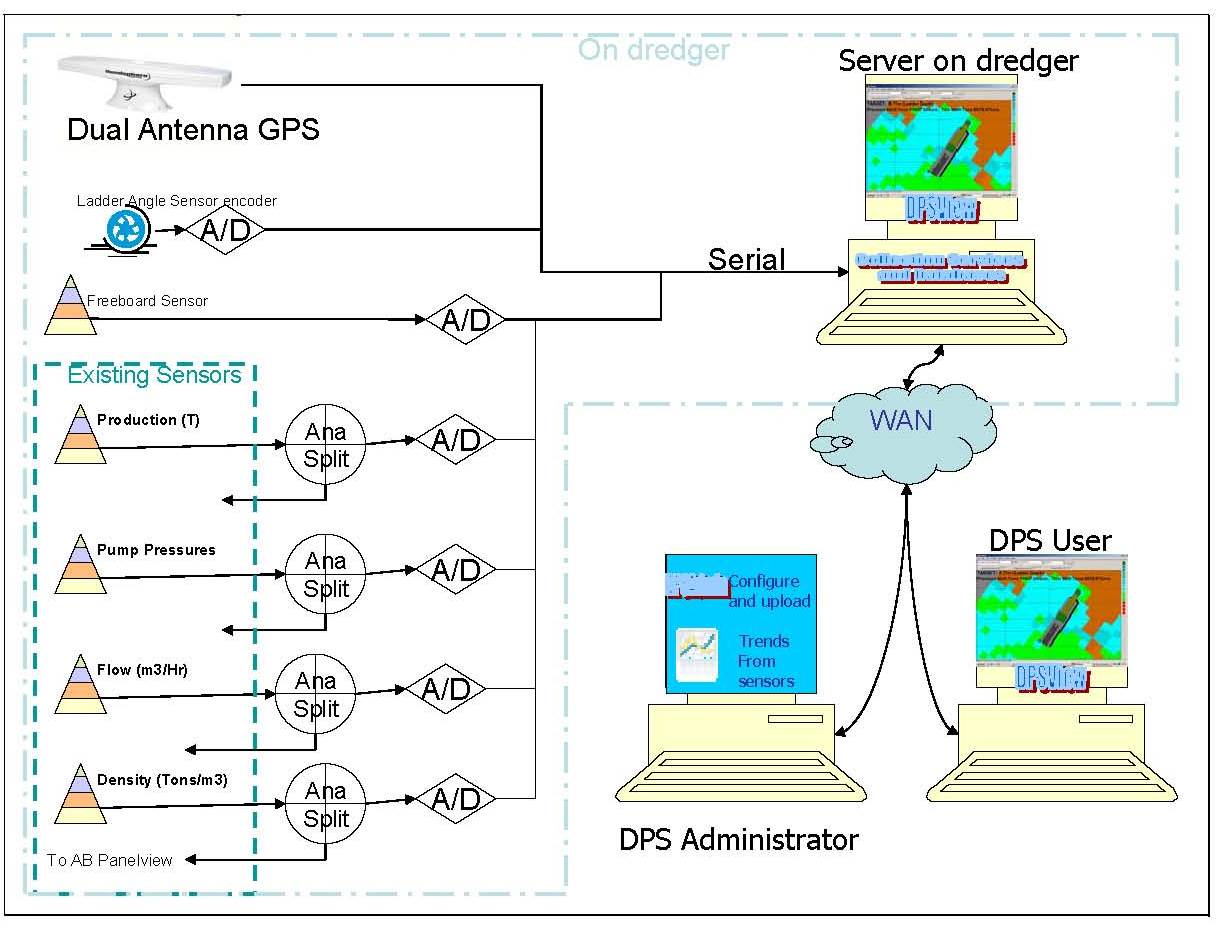
At the heart of the DPMS is the GPS and compass System. This not only provides the XY position of the dredge, but also the height on any given time. The exact position (X,Y,Z) of the mining wheel can be calculated by using the X,Y,Z from the GPS and using the dredge dimensions and compass heading. Other inputs required are Freeboard height and ladder angle to the point of mining. In the diagram below, the basic action flow is outlined of the DPMS process. The main purpose is to provide the dredger operator with an accurate target depth to mine to and then to display and log progress and other mining information for the whole mining area. The information entered from mine planning includes the planned mine paths and depth surveys determining the clay floor as well as the measured mine face. Target depths can then be determined by placing the cutter wheel position into a 3 dimensional digital terrain model built up in the DPMS program from the survey data

The Software Components
DPSView |
User Interface display dredged areas, mine plan and real time targets and |
DredgePos |
Service which reads and translates data from the GPS, Compass, Dredger PLC and updates the Historian and SQL Server tables |
DPSAdmin |
Administrative program which is used to extract data from the area based tables (SQL Server) or time based (Historian) |
OverMining |
This option is installed where strict control is required over the area to be dredged. The positional information is used to calculate when the dredger gets too close to a perimeter and will interface with he Dredger PLC to stop the dredge swing |
AntiCollision |
This option can be installed where more than one dredger is present to inhibit dredger swing when they get closer than a certain distance from each other. |
Historian |
The Historian used is GE's Proficy Historian. Positional data from the GPS and compass is written by the Dredgepos system to the Historian. |
SQLServer |
Microsoft's SQL Server is used to save the grids (5x5m as well as 1x1m) and all aggregates from the data that was logged per square as it is mined. |
OPC Server |
Kepserver is used to interface with the Dredger and plant PLC's in order to retrieve and write certain information. |
Typical System Layout:
Typical screenshots from the viewer:

Single Dredger display showing dredge symbol on mine plan with colour coded parameter (In this case 'Uninfluenced Sand Thickness') Green areas are areas mined on target, Blue areas above target and Red areas below target per 5x5m square. Mined squares are shown with dredging channels vertically orientated on the screen. Also shown are mining panels and grids (all of which are entered periodically directly from mine planning software)

Single Dredger display; similar to previous screen, but also showing all monitored parameters in detail as well as the current dredging target. This parameter can be updated daily from the DPSAdmin program.
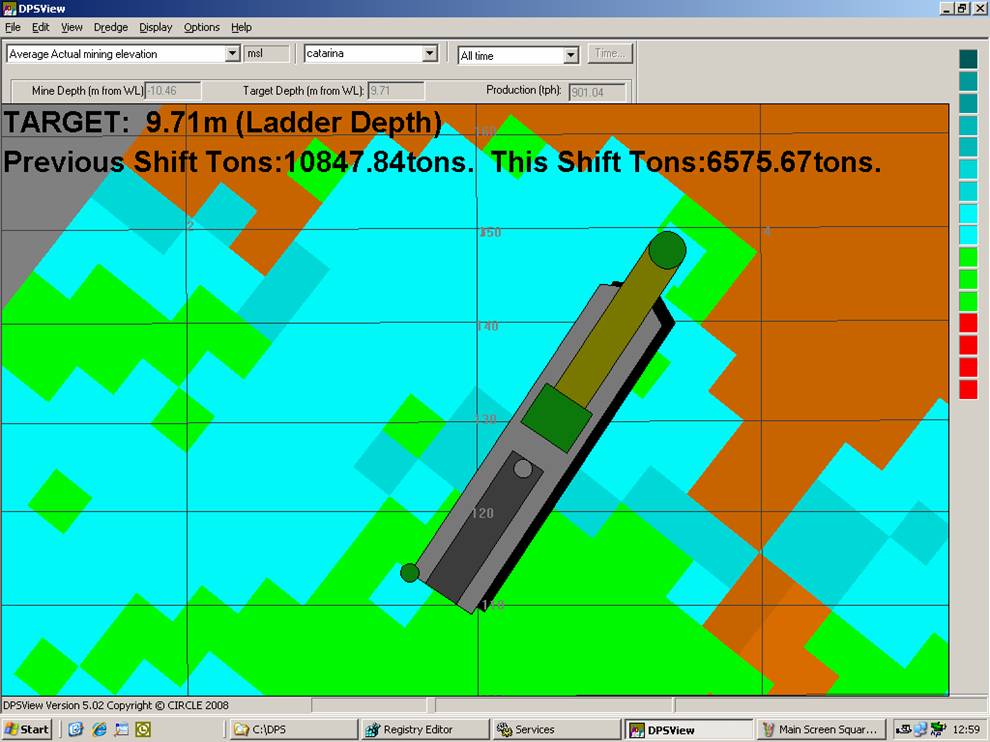
Single Dredger in Zoomed in view showing dredge channels. This view is used for Dredge Positioning.
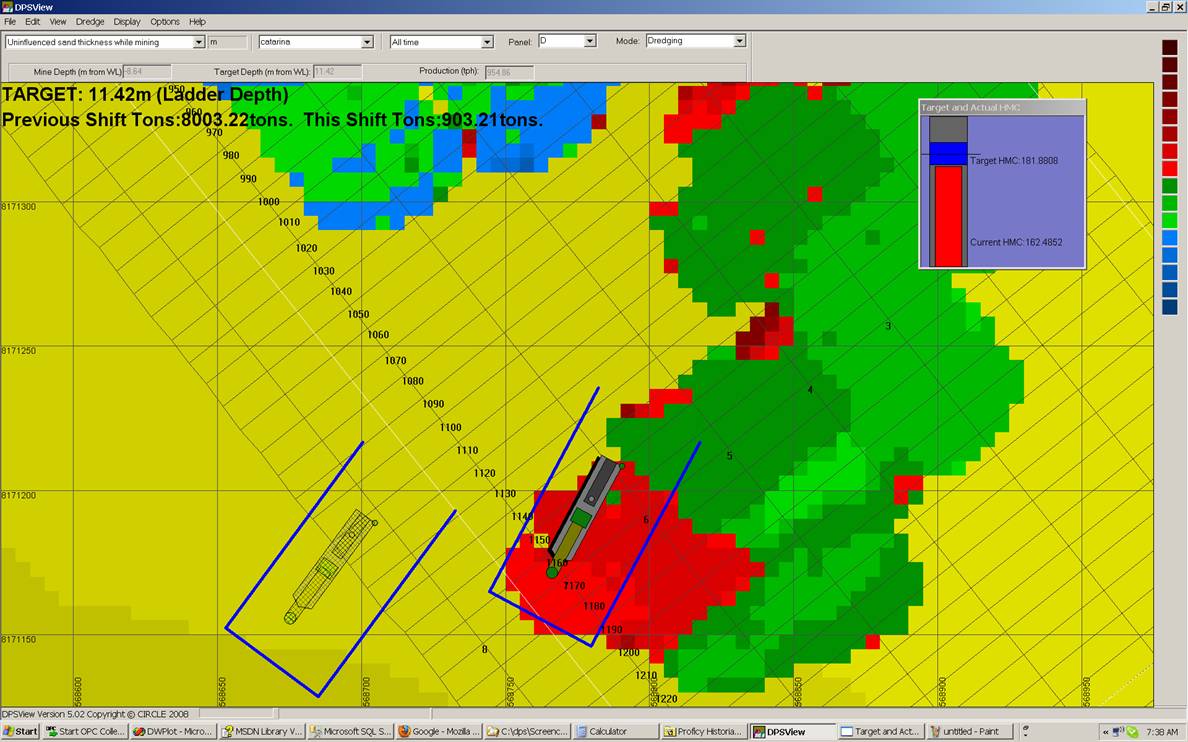
Two dredgers (Active dredge in solid colours) showing dredging target as well as Anti-Collision Borders. Anti Collision is part of the DPS System

3d View. This view is also colour coded and can be rotated, moved and scaled. It show both the dredge and dredged area in 3d.
Contact Us
Circle Electronics
Telephone
- +27 (0)35 7533 766
FAX
- +27 (0)35 7534 489